The Layer Between Your Data and Your AI Tool, Explained
When your AI analytics tool connects to your database, it reads the schema.
Field names. Table structures. Column types. That's it.
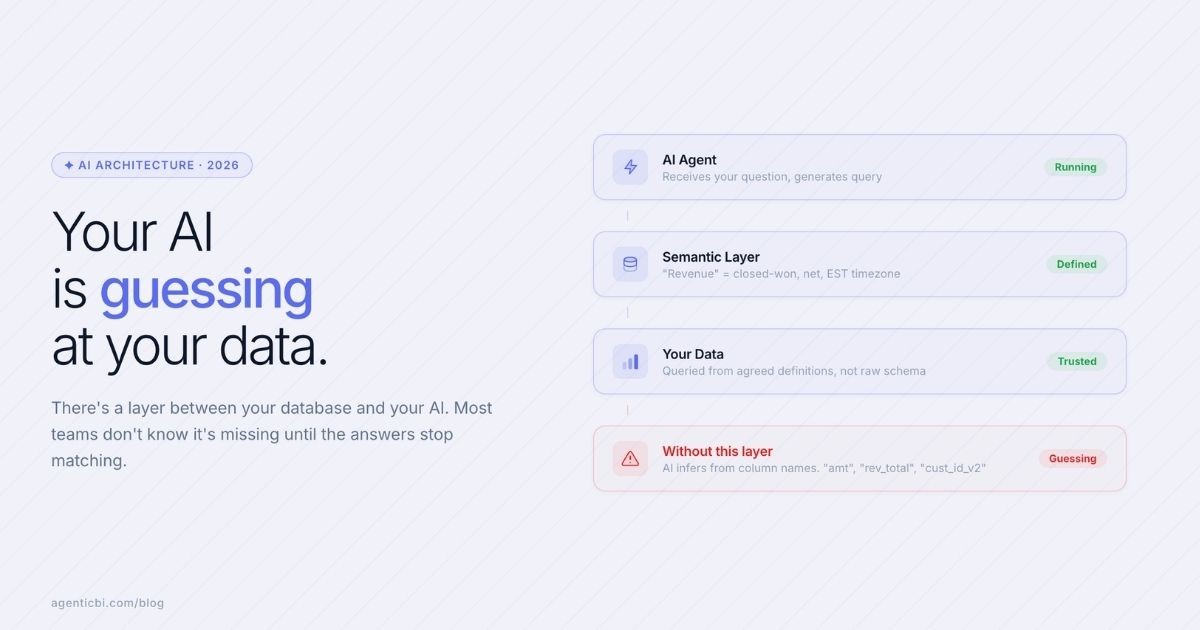
From there, it infers what everything means. "amt." "rev_total." "cust_id_v2." It guesses.
It's often wrong. And when it's wrong, it doesn't tell you.
What a Semantic Layer Is
A semantic layer sits between your raw data and anything that queries it.
It answers the question your schema doesn't: what does this field actually mean?
"Revenue" in this context means closed-won deals, net of refunds, recorded in Eastern Time. Not gross. Not pipeline. Not whatever the column name suggests.
Your AI queries through this layer instead of reading the schema directly. It gets definitions, not guesses.
The Moment You Realize You Needed One
Here's what it looks like when there's no semantic layer.
You ask your AI: "What's our revenue this month?" The AI finds a column called "revenue." Returns a number. The chart looks right.
Your finance person asks the same question later. The AI finds a different table with a similar column. Different number.
No error. No warning. Two confident answers. You spend Tuesday afternoon trying to figure out which one to put in the investor update.
That's the moment. And it happens to almost every team that connects AI directly to a raw database.
The Tools That Handle This (and What They Require)
For teams with a full data stack, tools like dbt, Cube, AtScale, and Kyvos build this layer. They're powerful.
dbt
Version-controlled metric definitions, tightly integrated with your data transformation workflow. Requires a data engineer.
Cube
API-first semantic layer with pre-aggregation so AI agents don't hammer your warehouse. Developer-led setup.
AtScale
Built for enterprise governance. Strong access controls and audit logging. Primarily for large organizations.
Kyvos
Handles extreme-scale query performance via pre-aggregated OLAP cubes. Optimized for speed, not flexibility.
Each one handles a different slice of the problem. Each one requires an engineer to set up and maintain.
If your team has that, the deeper comparison matters. If it doesn't, the question becomes simpler: does your AI analytics tool include this layer for you?
What to Check Before Picking an AI Analytics Tool
One question. Where are definitions stored?
If the AI reads your schema directly, you're relying on column names to carry meaning. This works for small, clean, single-source databases. It breaks when your data has evolved, has multiple sources, or uses the same concept in different tables.
If the AI queries through a definition layer, you're in a better position. Define "revenue" once. Every query uses that definition. Whoever asks.
AgenticBI includes this layer. You connect your data source, define your key fields and business rules, and every question gets answered from those definitions. Not from the schema. Not from inferred column meanings.
Connect your first source. Define your key fields. Ask questions from a foundation that actually knows what your data means. Try AgenticBI today!
Try AgenticBI
The AI data analyst for teams without a data team
Your numbers live in your database, your tools, and a dozen spreadsheet tabs, each telling a slightly different story. AgenticBI connects to all of them, runs the query, and hands back one answer. You ask in your own words. Agents do the analysis. And it can run on its own AI, so your data never leaves for a third party.
What you can do with AgenticBI:
Free to start. Your data can stay yours, nothing goes to OpenAI or any outside model.
Learn more
Discover more from the latest posts.


