Power BI Copilot Cost in 2026: What Small Teams Hit First
Power BI Copilot requires paid Fabric capacity on top of your per-user license. Pro users don't get it. Premium Per User (PPU) doesn't get it either, despite the name. Fabric capacity starts at F2 (approximately $262/month at the organizational level) as of April 2025, when Microsoft lowered the minimum from F64. But adding that capacity to your existing Pro licenses is step one of at least four before Copilot does anything useful. Here's the full picture.
Quick Summary (TL;DR)
Power BI Copilot is not included in Pro ($10/user) or PPU ($20/user) licenses. You need a separate paid Fabric capacity at the organizational level, starting at F2 (~$262/month).
Microsoft lowered the Copilot minimum from F64 to F2 in April 2025. The entry price dropped significantly, but the setup requirements did not.
Before Copilot answers a single question, your data must be modeled in a Power BI semantic layer. That modeling work requires a data engineer or BI developer.
Data Agents, the most capable AI feature in the Power BI ecosystem, still require F64 capacity or higher, which runs $5,000-$8,000+/month depending on region.
MongoDB BI Connector reaches end-of-life in September 2026. Teams using it to feed Power BI need a migration plan this year.
For teams without existing data infrastructure, there is a faster path.
What Power BI Copilot Actually Is
Copilot is an AI assistant embedded inside Power BI reports and the Power BI service. You ask it a question. It answers based on whatever measures and fields are already defined in your semantic model. It can summarize a report, create a new chart, write a DAX formula, and continue a multi-turn conversation.
It does not monitor your metrics overnight. It does not flag anomalies before you open the dashboard Monday morning. It does not query your MongoDB database or Stripe API directly. Every answer it gives is constrained by what a data engineer modeled before you typed anything. That is the architectural reality of how Copilot works, and it shapes everything about who the product is useful for.
The License Reality
Power BI licensing has three individual tiers. Copilot is accessible on none of them by themselves. To use Copilot, you need two things: a qualifying user license and a workspace backed by paid organizational capacity.
License / Capacity | Copilot access? | Cost | Notes |
|---|---|---|---|
Power BI Pro | No | $10/user/month | No Copilot regardless of workspace |
Premium Per User (PPU) | No | $20/user/month | PPU workspace does not meet capacity requirement |
Fabric F2 capacity | Yes (basic) | ~$262/month (org-level) | Report building, DAX, summaries. Added on top of per-user cost. |
Fabric F64+ capacity | Yes (full, incl. Data Agents) | $5,000–$8,000+/month (org-level, varies by region) | Required for Copilot Studio Data Agents integration |
PPU has "Premium" in the name. It does not meet the capacity requirement for Copilot. The workspace must be backed by a paid Fabric SKU or Premium P1 capacity, separate from and in addition to the per-user license. This is documented in Microsoft's licensing guide but not prominently surfaced in the product marketing.
What Changed in April 2025
Microsoft lowered the minimum Fabric capacity required for Copilot from F64 to F2 in April 2025. Before that change, the entry cost was approximately $5,000-$8,000/month at the organizational level. After it, F2 capacity starts at roughly $262/month.
This made Copilot accessible to mid-market organizations for the first time. But the change in entry price did not change the setup requirements. You still need a semantic model. You still need a data engineer who built it. You still add the capacity cost on top of per-user licenses. And if you want the most capable AI feature, Data Agents (which let you build Copilot Studio integrations), that still requires F64 or higher.
What You Need Before Copilot Works
Capacity is the first gate, not the last. Even after enabling Fabric capacity, Copilot only works on data that has already been modeled in Power BI's semantic layer. That means someone, a data engineer or BI developer, has already done the following before any business user asks a question:
Defined measures and KPIs in DAX
Established relationships between tables
Cleaned and standardized field names so Copilot can interpret them correctly
Documented the model so Copilot understands context (e.g., which measure to use when someone asks about "margin")
Without this groundwork, Copilot returns unreliable results or fails to answer at all. The promise is "ask your data anything." The actual scope is "ask your data anything, as long as a data engineer has already defined it." For teams without that person, that gap is the real barrier, not the license cost.
The NoSQL and MongoDB Problem
Power BI cannot query MongoDB, Elasticsearch, or REST APIs natively. Data from these sources must be extracted, transformed into a relational format, and loaded into a model before Copilot can interact with it. That is a data pipeline, which requires engineering time to build and maintain.
There is a more immediate issue for MongoDB users: the MongoDB BI Connector, the most widely used method for connecting MongoDB data to Power BI, reaches end-of-life in September 2026. Teams relying on it for Power BI connectivity need to migrate to the MongoDB SQL Interface or a third-party connector before that date. This is a migration project independent of any Copilot adoption decision.
On MongoDB, Elasticsearch, or a REST API? AgenticBI connects directly. No ETL, no pipeline, no modeling layer. Free to start.
What "Agentic AI" Means in the Power BI Context
Microsoft uses "agentic AI" and "Data Agents" to describe a specific feature: an integration between Copilot Studio and Power BI semantic models, requiring F64 capacity. It allows developers to build AI agents that answer questions using a Power BI dataset as the knowledge source.
This is a developer-facing tool. It is not a background system that monitors your metrics, detects changes, and delivers answers before you ask. It is an architecture for building assistants on top of pre-modeled data. For a detailed breakdown of where Power BI's AI capabilities start and stop, the full Power BI agentic AI breakdown covers the architecture and cost in detail.
What Works Better for Teams Without Existing Infrastructure
If you don't have a semantic layer, a data warehouse, or a BI developer maintaining models, Power BI's Copilot features don't unlock until those prerequisites are in place. The license cost is the visible barrier. The setup cost is the real one.
For analytics without a data team or building dashboards without SQL, the practical alternative is a tool that connects directly to wherever data already lives: SQL databases, MongoDB, Elasticsearch, or APIs. No modeling layer required. See how the major AI analytics platforms compare on architecture, NoSQL support, and pricing.The comparison against other tools in this category is in the Power BI alternatives breakdown.
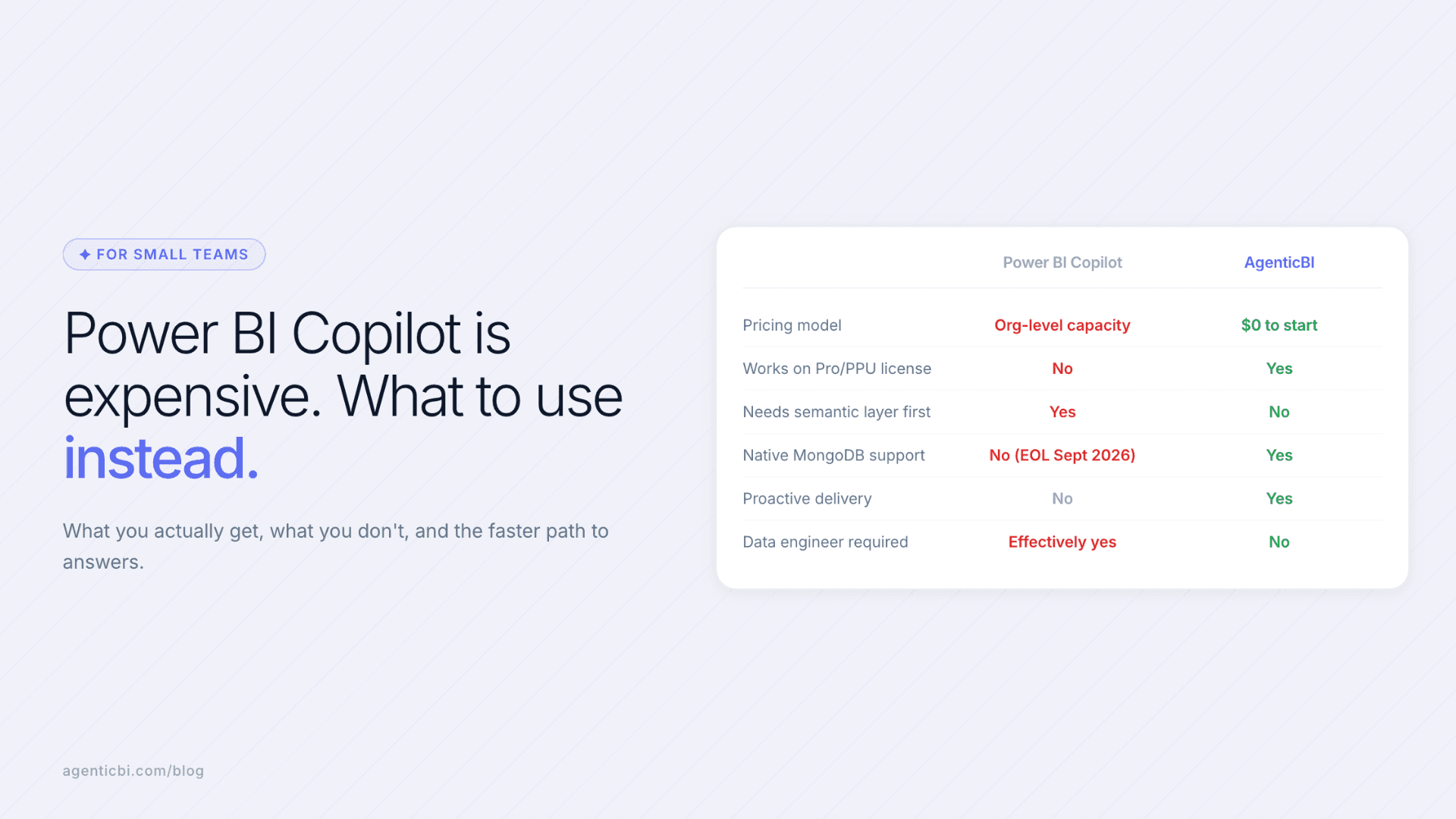
Requirement | Power BI Copilot | AgenticBI |
|---|---|---|
Org-level capacity to use AI | Yes (F2+ on top of per-user license) | No |
Semantic layer required before first query | Yes | No |
Native MongoDB / NoSQL support | No (requires ETL; BI Connector EOL Sept 2026) | Yes |
Proactive metric delivery | No | Yes |
Data engineer needed for setup | Effectively yes | No |
Starting cost | $10/user + $262/month capacity (minimum) | $0 |
Frequently Asked Questions
Does Power BI Copilot work on a Pro or PPU license?
No. Both Power BI Pro ($10/user) and Premium Per User ($20/user) lack the organizational capacity requirement for Copilot. You need a separate paid Fabric capacity (F2 or higher) or Power BI Premium P1 backing the workspace. PPU workspaces do not meet this requirement despite the "Premium" name.
How much does Power BI Copilot cost in 2026?
The minimum entry is Fabric F2 capacity at approximately $262/month, paid at the organizational level, in addition to existing per-user licenses. This is the entry point for basic Copilot features (report building, DAX generation, summaries). Data Agents and Copilot Studio integrations require F64 capacity, which runs $5,000-$8,000+/month depending on Azure region. Microsoft lowered the minimum from F64 to F2 in April 2025.
What does Power BI Copilot actually do?
It answers questions about data already modeled in a Power BI semantic layer, generates report pages and charts from natural language descriptions, writes DAX formulas, and summarizes existing reports. It does not proactively surface insights, cannot query data outside the pre-built semantic model, and does not connect directly to NoSQL databases without ETL.
Can small teams use Power BI Copilot without a data engineer?
In practice, no. Copilot requires a semantic model to be built and maintained before it can answer questions. Building that model (defining measures, relationships, and field metadata) is technical work that requires a data engineer or BI developer. The capacity cost is the visible barrier, but the modeling prerequisite is the real one for most small teams.
What happens to MongoDB and Power BI after September 2026?
The MongoDB BI Connector, the most common way to connect MongoDB to Power BI, reaches end-of-life in September 2026. Teams using it must migrate to the MongoDB SQL Interface or a third-party connector. This migration is required regardless of whether you use Copilot. Copilot does not resolve the underlying connectivity requirement for NoSQL data.
What is a faster alternative for teams without a semantic layer?
Tools that connect directly to source databases (SQL, MongoDB, Elasticsearch, REST APIs) and answer questions without a pre-built modeling layer. The practical difference: setup takes minutes instead of weeks, and business users can ask questions without filing a ticket to a data engineer. AgenticBI is one option in this category, starting at $0.
Related Reading
Agentic BI vs Conversational BI: What the Difference Actually Means
Dashboard Without SQL: Three Ways to Build Visualizations from Your Data
Analytics for Small Teams: Getting Data Answers Without a Data Analyst
Try AgenticBI
The AI data analyst for teams without a data team
Your numbers live in your database, your tools, and a dozen spreadsheet tabs, each telling a slightly different story. AgenticBI connects to all of them, runs the query, and hands back one answer. You ask in your own words. Agents do the analysis. And it can run on its own AI, so your data never leaves for a third party.
What you can do with AgenticBI:
Free to start. Your data can stay yours, nothing goes to OpenAI or any outside model.
Learn more
Discover more from the latest posts.


